
← Back to Computer Application Class 10
HTML (HyperText Markup Language) is the foundation of web designing and is an important topic in the Class 10 IT syllabus. Students learn about HTML tags, attributes, lists, tables, forms, and linking to create structured web pages. These HTML Class 10 Questions and Answers provide clear explanations, solved examples, and exam‑ready content. With simple language and practice questions, this guide helps students revise quickly and score better in exams.
HTML Class 10 Questions and Answers
1. Differentiate between a tag and an attribute in HTML with the help of a suitable example.
Answer:
- HTML tag: The HTML tag is a keyword enclosed in angle brackets; it helps to create elements in HTML. For example, the tag is to show an image.
- Attribute: The attributes provide additional information about an element/tag. An attribute is always used in the start tag. For example, <img src=”flower.jpg” width=”200″> here, “src” and “width” are the attributes.
2. What is the purpose of ‘<dt>’ <DT> and ‘<dd>’ <DD> tags in a description list?
Answer: ‘<dt>’ <DT> is used to define a term in a description list, while ‘<dd>’ <DD> is used to provide the description or explanation of that term.
3. Explain the purpose of the following tags:
- (i) <P>
- (ii) <HR>
Answer:
- <p> The tag is used to define a paragraph in an HTML document.
- <hr> The tag used to insert a horizontal rule means a line across the page; it helps to separate the content.
4. What is CSS, and why is it used in web designing?
Answer: CSS stands for Cascading Style Sheets. It describes how HTML elements should be displayed on screen, paper, or other media. CSS helps for a uniform look across all pages of a website. It allows the designers to change fonts, colors, margins, and layouts easily. CSS is used for designing transitions, animations, hover effects, modern layouts, etc.
5. Ravi has designed a vibrant web page filled with colorful images and festive text to celebrate his friend’s graduation. Help him by writing suitable HTML tag(s) to add a celebratory video to his web page as per the specification given below:
- (i)The name of the video file is celebration. mp4.
- (ii) The video controls (Play, Pause, Volume, etc.) should be visible.
- (iii) The video should automatically start playing when the web page loads.
Answer: The HTML code Ravi can use to add the celebratory video—
<video src="celebration.mp4" controls autoplay>
        Your browser does not support the video tag.
</video>- <video> : It is used to embed a video file in the webpage.
- src=”celebration.mp4″: It specifies the video file name.
- Controls: It helps to display Play, Pause, Volume, and other controls.
- autoplay: It can start the video automatically when the page loads.
6. Explain the significance of linking in HTML.
Answer: Linking in HTML is significant because it connects one web page to another; this helps the users to navigate between pages, documents, or media. Without the linking, the web will not be able to perform as a “web” of interconnected information.
- Hyperlink: This is a clickable connection from one resource to another.
- Anchor tag <a>: This anchor tag helps to create links.
- href attribute: It helps to specify the destination of a URL or file path.
Example:
<a href="https://cbseskilleducation.com">Skill Education Website</a>7. Write the appropriate HTML tag with the correct attributes to achieve the following requirements:
- The links that have not been visited should appear in blue.
- The links that have already been visited should appear in purple.
Answer: The appropriate HTML tags with the correct attributes are
<!DOCTYPE html>
<html>
<head>
<style>
a:link {
    color: blue;   /* Unvisited links */
}
a:visited {
    color: purple; /* Visited links */
}
</style>
</head>
<body>

<p>Check out <a href="https://www.example.com">Example Website</a></p>

</body>
</html>
8. Write suitable HTML statements to display the following text on a webpage:
- (i) H2O
- (ii) E=mc²
Answer: The suitable HTML statements to display the following text on a webpage are
(i) H<sub>2</sub>O
(ii) E = mc<sup>2</sup>
9. Write suitable HTML statements to display the following text on a web page:
- (i)Ca(OH)₂
- (ii) 2(A2 + B2)
Answer:
(i) Ca(OH)<sub>2</sub>
(ii) 2(A<sub>2</sub> + B<sub>2</sub>)
10. State whether the following statements are true or false:
- (i)The link attribute is used to define the color of visited links.
- (ii) A title is an attribute of <head> a tag.
- (iii) The <line> tag is used to insert a horizontal line on a web page.
- (iv) The face attribute of the <font> tag specifies the font name.
Answer:
(i)The link attribute is used to define the color of visited links.
Answer: False
(ii) A title is an attribute of <head> a tag.
Answer: False
(iii) The <line> tag is used to insert a horizontal line on a web page.
Answer: False
(iv) The face attribute of the <font> tag specifies the font name.
Answer: True
11. Arun, a web designer, is creating a web page and wants to add a clickable image named ‘python.jpg.’ The image is stored in the same directory as the web page. He wants the image link to direct users to “https://www.python.com.” Write the HTML code to help him to create the web page.
Answer: The suitable HTML code Arun can use to make the image is
<!DOCTYPE html>
<html>
<head>
  <title>Clickable Image Example</title>
</head>
<body>

<!-- Clickable image linking to Python website -->
<a href="https://www.python.com">
  <img src="Python.jpg" alt="Python Image">
</a>

</body>
</html>
12. Write HTML code to create an ordered list with items C, Java, and Python starting from 5 and ending at 7.
Answer:
<!DOCTYPE html>
<html>
<head>
  <title>Ordered List Example</title>
</head>
<body>

<ol start="5">
  <li>C</li>
  <li>Java</li>
  <li>Python</li>
</ol>

</body>
</html>
13. Explain the following HTML attributes:
- (i) ALT attribute of <img> tag
- (ii) a link attribute of <body> a tag
Answer:
- (i) The ALT tag provides alternative text for an image. It helps to display text when the image cannot be loaded or is broken or due to slow internet.
- (ii) It helps to define the color of active links, which are links being clicked. It enhances user experience by giving visual feedback when a link is clicked.
14. (a) Archit has created a web page with lots of images and colorful text to wish a happy birthday to his mother. Help him to add audio to his web page by following the given instructions:
- (i) The name of the audio file is “birthday.mp3.”
- (ii) The audio controls like Play, Pause, and Volume should be visible.
- (iii) The audio should keep playing in a loop.
Answer: The HTML code archit can use
<!DOCTYPE html>
<html>
<head>
  <title>Birthday Audio</title>
</head>
<body>

<audio src="birthday.mp3" controls loop>
  Your browser does not support the audio element.
</audio>

</body>
</html>
(b) Write suitable HTML code to create the following description list:
HTML
Hypertext Markup Language
Used for creating web pages
Answer: The suitable HTML code is
<!DOCTYPE html>
<html>
<head>
  <title>Description List Example</title>
</head>
<body>

<dl>
  <dt>HTML</dt>
  <dd>Hypertext Markup Language</dd>
  <dd>Used for creating web pages</dd>
</dl>

</body>
</html>
15. Write suitable HTML statements to display the following text on a web page:
- (i) H2SO4
- (ii) (A+B+C)3
Answer:
(i) H<sub>2</sub>SO<sub>4</sub>
(ii) (A + B + C)<sup>3</sup>
16. Name any one empty element and any one container element in HTML.
Answer: The empty element does not have a close tag. For example, <hr>, <img>, <br>tag, etc. The container tag has an open and a close tag, for example,<font> etc.
17. State whether the following statements are true or false:
- (i) is the highest level of heading and <h4> is the lowest level of heading in HTML.
- (ii) A visited link is purple colored by default in HTML.
- (iii) The character ‘#’ is used to start a comment text in HTML.
- (iv) <b> is an empty tag in HTML as it does not need to be closed.
Answer:
(i) is the highest level of heading and <h4> is the lowest level of heading in HTML.
Answer: False
(ii) A visited link is purple colored by default in HTML.
Answer: True
(iii) The character ‘#’ is used to start a comment text in HTML.
Answer: False
(iv) <b> is an empty tag in HTML as it does not need to be closed.
Answer: False
18. (a) Write the HTML code to create a link to the web page having the URL www.festivals.com/india/diwali.html.
The mentioned web page should get opened in a new window/tab on clicking the text ‘FESTIVALS.’
Answer: The HTML code for creating a link to the web page is
<a href="http://www.festivals.com/india/diwali.html" target="_blank">
  FESTIVALS
</a>
19. Write HTML code to display the following line of text in bold and italics.
Happiness is not by chance, but by choice.
Answer: The HTML codes to display the text in bold and italics are
<b><i>Happiness is not by chance, but by choice. </i></b>20. Write the HTML code to set the background color of the web page as blue.
Answer:
<!DOCTYPE html>
<html>
<body bgcolor="blue">

<h2>Welcome to My Web Page</h2>
<p>The background is blue!</p>

</body>
</html>
21. Write the purpose of the following HTML tags:
- (i) <BR>
- (ii) <DL>
Answer:
- (i)The <br> tag is used to insert a line break in the text; it is an empty tag.
- (ii) The <dl> tag is used to define a description list in the HTML.
22. Write any two differences between Web Server and Web Client.
Answer: The web server stores the web-related program and delivers it to the client’s computer when requested. For example, Apache, IIS, and Nginx. On the other hand, the web client is a program like a browser that makes requests and displays the web page information from the server.
23. Give the full form of the following:
- (i)TCP/IP
- (ii) SSH
Answer: TCP/IP stands for Transmission Control Protocol/Internet Protocol. It is a fundamental communication protocol that is used on the internet. TCP helps to transfer data from one computer to another computer.
SSH is a protocol used to securely log in and manage remote systems over a network. It provides encrypted communication for commands and data transfer.
24. Consider the given URL: http://www.mypage.com/, Is it a secure website? Justify your answer.
Answer: No, the given website http://www.mypage.com/ is not secure.
“http://” stands for HyperText Transfer Protocol. It helps to transfer data from one computer to another without encryption. Instead of http://, the website should be https://. The https stands for HyperText Transfer Protocol Secure; the https uses SSL/TLS encryption to protect data.
25. Give any one advantage of CSS.
Answer: Some of the advantages for CSS are.
- Consistency: Same style across many pages.
- Easy updates: Change design in one place.
- Faster loading: Less code, quicker pages.
- Better design: Control layout, fonts, colors.
- Responsive sites: Works on mobile and desktop.
26. Sonal has been given an incomplete HTML code. Help her to complete the code by filling in the blanks as per the mentioned specifications:
<html>
<head>
<style>
p{
__________: Green; /* Line 1 */
__________: 12px; /* Line 2 */
__________: center; /* Line 3 */
color:yellow;
}
__________ { /* Line 4 */
width:50%
}
</style>
</head>
<body>
<p> Saving the environment is crucial for a healthier Earth </p>
<hr>
</body>
</html>- (i) Line 1: The background color of the paragraph should be green.
- (ii) Line 2: The font size of the paragraph text should be 12.
- (iii) Line 3: The alignment of the paragraph text should be centered.
- (iv) Line 4: The width of the horizontal ruler should be 50%.
Answer:
<html>
<head>
<style>
p {
  background-color: Green;   /* Line 1 */
  font-size: 12px;           /* Line 2 */
  text-align: center;        /* Line 3 */
  color: yellow;
}
hr {                         /* Line 4 */
  width: 50%;
}
</style>
</head>
<body>
<p> Saving the environment is crucial for a healthier Earth </p>
<hr>
</body>
</html>
27. During a practical exam, Ravi has been assigned an incomplete HTML code. Help him by filling the blanks according to the specifications provided.
<html>
<head><title>_________</title></head> <!--Line 1–->
<body __________ = "flowers.jpeg"> <!--Line 2–->
<h1> welcome</h1>
<ul__________> <!--Line 3–->
 <li> drinks</li>
 <li> desserts</li>
<ul>
<hr__________= "50%"> <!--Line 4–->
</body>
</html>- (i) Line 1: The title of the page should be “My Page.”
- (ii) Line 2: The web page should have the image “flowers.jpeg” in its background.
- (iii) Line 3: The list elements should have a filled square as a bullet.
- (iv) Line 4: The horizontal line should have a value of width as 50%.
Answer:
<html>
<head><title>My Page</title></head> <!-- Line 1 -->
<body background="flowers.jpeg"> <!-- Line 2 -->
<h1> welcome</h1>
<ul type="square"> <!-- Line 3 -->
 <li> drinks</li>
 <li> desserts</li>
</ul>
<hr width="50%"> <!-- Line 4 -->
</body>
</html>
28. Refer to the incomplete HTML code given below and complete the code based on the specifications provided.
<html>
<head> __________</head> <!-- Line 1 -->
<body>
<h1>My Favourite Fruits<h1>
<ol __________="I" __________="3"> <!-- Line 2 -->
__________ <!-- Line 3 -->
<li>Banana</li>
</ol>
</body>
</html>
Complete this code by filling in the blanks as per the specifications that follow:
- (i) Line 1: Set the web page title to ‘About Me.’
- (ii) Line 2: The ordered list should use uppercase Roman numerals for numbering.
- (iii) Line 3: The list should begin with Roman numeral III.
- (iv) Line 4: The first list item should be ‘Apple.’
Answer:
<html>
<head><title>About Me</title></head> <!-- Line 1 -->
<body>
<h1>My Favourite Fruits</h1>
<ol type="I" start="3"> <!-- Line 2 -->
<li>Apple</li> <!-- Line 3 -->
<li>Banana</li>
</ol>
</body>
</html>
29. Complete the following CSS code by filling in the blanks according to the given specifications.
<html>
<head>
<style>
body {
__________; <!-- Line 1 -->
}
h4 {
__________: blue; <!-- Line 2 -->
font-size:24px;
__________; <!-- Line 3 -->
}
__________ <!-- Line 4 -->
</head>
</html>- (i) Line 1: The background color of the page should be pink.
- (ii) Line 2: The font color of the h4 text should be blue.
- (iii) Line 3: The margin around the h4 text should be 20px.
- (iv) Line 4: Fill the blank using the closing style tag.
Answer:
<html>
<head>
<style>
body {
  background-color: pink;   /* Line 1 */
}
h4 {
  color: blue;              /* Line 2 */
  font-size: 24px;
  margin: 20px;             /* Line 3 */
}
</style>                    <!-- Line 4 -->
</head>
</html>
30. An incomplete CSS code within <head> . . . </head> is given below. Complete this code by filling in the blanks as per the specifications that follow.
<head>
  <style>
  body {__________ :  __________ ; } <!--line 1 –->
  P {
  __________:  __________ ; <!--line 2 –->
  __________:  __________ ; <!--line 3 –->
  }
  __________ <!--line 4 –->
  h2 {
  Color : Blue;
  }
  </style>
</head>- (i) Line 1: Page background color should be yellow.
- (ii) Line 2: The color of the paragraph text should be red.
- (iii) Line 3: The font family of the paragraph text should be Arial.
- (iv) Line 4: The second biggest heading should be blue in color.
Answer:
<head>
<style>
body {
  background-color: Yellow;   /* Line 1 */
}
p {
  color: Red;                 /* Line 2 */
  font-family: Arial;         /* Line 3 */
}
h2 {                          /* Line 4 */
  color: Blue;
}
</style>
</head>
31. The following HTML code is expected to create an ordered list for a web page:
<html>
 <body __________ : yellow> <!-- line 1 -->
 <p>
 <font __________= Helvetica> <!-- line 2 -->
 FESTIVALS OF INDIA
 </p>
 <__________> <!-- line 3 -->
     <__________>HOLI <__________> <!-- line 4 ––>
     <__________>DIWALI <__________> <!-- line 5 -->
 <__________> <!-- line 6 ––>
Answer:
<html>
<body bgcolor="yellow"> <!-- line 1 -->
<p>
<font face="Helvetica"> <!-- line 2 -->
FESTIVALS OF INDIA
</p>
<ol> <!-- line 3 -->
    <li>HOLI</li> <!-- line 4 -->
    <li>DIWALI</li> <!-- line 5 -->
</ol> <!-- line 6 -->
</body>
</html>
32. Complete this code by filling in the blanks as per the specifications that follow:
- (i) Line 1: The background color of the web page should be yellow.
- (ii) Line 2: The font for the paragraph should be Helvetica.
- (iii) Line 3 and Line 6: An ordered list should start and end.
- (iv) Line 4 and Line 5: Listing of the ordered list items.
Answer:
<html>
<head>
<style>
body {
  background-color: Yellow;   /* Line 1 */
}
p {
  color: Red;                 /* Line 2 */
  font-family: Arial;         /* Line 3 */
}
h2 {                          /* Line 4 */
  color: Blue;
}
</style>
</head>
</html>
33. The following HTML statements are not written properly. Rewrite the correct statements with underlined corrections. The desired purpose of each statement is mentioned under it.
- (i)Click here.</a>
- <! – – The link should navigate to https://ncert.nic.in – ->
- (ii) <ul type=”O”>
- <! – The list should use a hollow circle as a bullet. – ->
- (iii) <font color=Arial size=5>My Webpage</font>
- <!– The font should be Arial, and the size of the font should be 5. –>
Answer:
- (i)Incorrect: <a link=”https://ncert.nic.in/”>Click here
- Correct: <a href=”https://ncert.nic.in/”>Click here</a>
- (ii) Incorrect:
- Correct:<ul type=”circle“>
- (iii) Incorrect: <font color=Arial size=5>My Webpage
- Correct: <font face=”Arial” size=”5″>My Webpage</font>
34. The following HTML statements are not written properly. Re-write the correct statements with underlined corrections. The desired purpose of each statement is mentioned under it.
- (i) <img href=”image.jpg” width=”300″>
- <!– The image path should be “image.jpg”, and the the image width should be 300 pixels. –>
- (ii) <font height=”18″>
- <!– The size of the font should be 18 points. –>
- (iii) <a mail=”info@cbse.gov.in”>Send Email</a>
- <! — The link should open the user’s default email application to send an email to info@cbse.gov.in–
Answer:
- (i) Incorrect:
- Correct:<img src=”image.jpg” width=”300″>
- (ii) Incorrect:
- Correct:<font size=”18″>
- (iii) Incorrect: <a mail=”info@cbse.gov.in”>Send Email
- Correct: <a href=”mailto:info@cbse.gov.in”>Send Email</a>
35. The following HTML statements are not written properly. Re-write the correct statements with underlined corrections. The desired purpose of each statement is mentioned under it.
- (i) <BODY image=”background.jpg”>
- <!–Page background should display the image named background. jpg–>
- (ii) <FONT height=5>
- <!–Font should be 5 in size–>
- (iii) <img src=”img.jpg” text=”An Image”>
- <! -Image source should be img.jpg, and its alternate text should be “An Image”>
Answer:
- (i) Incorrect:
- Correct:<BODY background=”background.jpg”>
- (ii) Incorrect:
- Correct:<FONT size=”5″>
- (iii) Incorrect:
- Correct:<img src=”img.jpg” alt=”An Image”>
36. Write HTML code to create a hyperlink for sending an email to “help@cbse.gov.in” when the user clicks on the text ‘HELP’.
Answer:
<html>
<body>
<a href="mailto:help@cbse.gov.in">HELP</a>
</body>
</html>
37. Write the HTML code to design the webpage with the form as shown below:
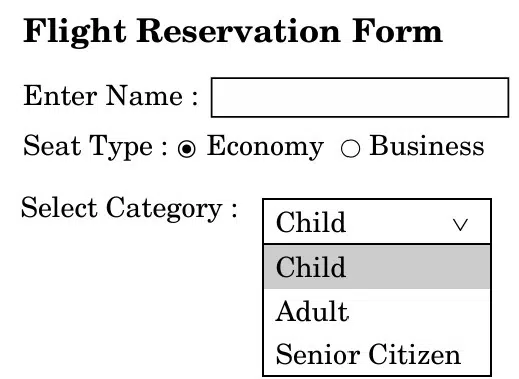
Please note the following specifications while writing the code:
- Specification 1: The text “Flight Reservation Form” should be in heading level 3.
- Specification 2: There should be a text box to accept the name of the passenger.
- Specification 3: Two radio buttons to choose the seat type (Economy or Business) as shown above. Economy should be the default selected radio button.
- Specification 4: Passenger’s category to be chosen from a combo box having options as Child, Adult, and Senior Citizen.
Answer:
<html>
<head>
<title>Flight Reservation</title>
</head>
<body>
<h3>Flight Reservation Form</h3>

<form>
  <!-- Specification 2: Text box for passenger name -->
  Enter Name: <input type="text" name="passengerName"><br><br>

  <!-- Specification 3: Radio buttons for seat type -->
  Seat Type:
  <input type="radio" name="seat" value="Economy" checked> Economy
  <input type="radio" name="seat" value="Business"> Business
  <br><br>

  <!-- Specification 4: Combo box for passenger category -->
  Select Category:
  <select name="category">
    <option>Child</option>
    <option>Adult</option>
    <option>Senior Citizen</option>
  </select>
</form>

</body>
</html>
38. Write the HTML code to design the web page as shown below considering the given specifications:
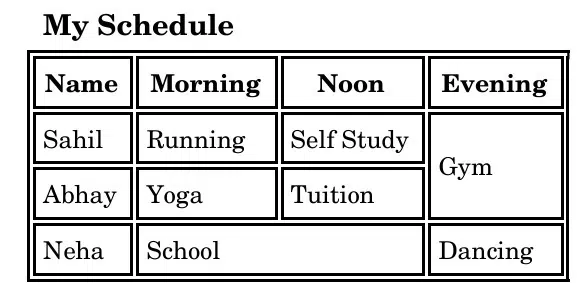
- Specification 1: The webpage code should follow the correct HTML structure. “My Schedule” should be displayed using the first-level heading, and the background color of the page should be light yellow.
- Specification 2: Use the table header tag for the column headers.
- Specification 3: The table should have exactly 4 rows and 4 columns, with the first row displaying the table header and the remaining rows for student data, as shown above.
- Specification 4: The table should use rowspan and colspan, wherever required, as shown in the given table.
Answer:
<html>
<head>
<title>My Schedule</title>
</head>
<body bgcolor="lightyellow">
<h1>My Schedule</h1>

<table border="1" cellpadding="5" cellspacing="0">
  <tr>
    <th>Name</th>
    <th>Morning</th>
    <th>Noon</th>
    <th>Evening</th>
  </tr>
  <tr>
    <td>Sahil</td>
    <td>Running</td>
    <td>Self Study</td>
    <td>Gym</td>
  </tr>
  <tr>
    <td>Abhay</td>
    <td>Yoga</td>
    <td>Tuition</td>
    <td rowspan="2"> <!-- Rowspan used for empty evening cell -->
    </td>
  </tr>
  <tr>
    <td>Neha</td>
    <td>School</td>
    <td colspan="1"></td> <!-- Colspan used for empty noon cell -->
    <td>Dancing</td>
  </tr>
</table>

</body>
</html>
39. Write HTML code to design the web page as shown below considering the given specifications:
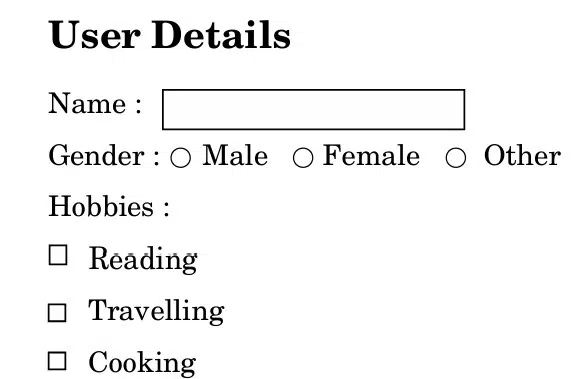
- Specification-1: The web page title should be set to “User Information Form,” and the web page should follow proper HTML structure.
- Specification-2: The form should include a textbox to input the user’s name.
- Specification-3: The form should provide three radio buttons (Male, Female, and Other) for selecting Gender.
- Specification-4: The form should display three checkboxes (Reading, Travelling, and Cooking) for Hobbies.
Answer:
<html>
<head>
<title>User Information Form</title>
</head>
<body>
<h2>User Details</h2>

<form>
  <!-- Specification 2: Textbox for Name -->
  Name: <input type="text" name="username"><br><br>

  <!-- Specification 3: Radio buttons for Gender -->
  Gender:
  <input type="radio" name="gender" value="Male"> Male
  <input type="radio" name="gender" value="Female"> Female
  <input type="radio" name="gender" value="Other"> Other
  <br><br>

  <!-- Specification 4: Checkboxes for Hobbies -->
  Hobbies:
  <input type="checkbox" name="hobby" value="Reading"> Reading
  <input type="checkbox" name="hobby" value="Travelling"> Travelling
  <input type="checkbox" name="hobby" value="Cooking"> Cooking
</form>

</body>
</html>
40. Write the HTML code to insert the following table on the web page considering the given specifications:
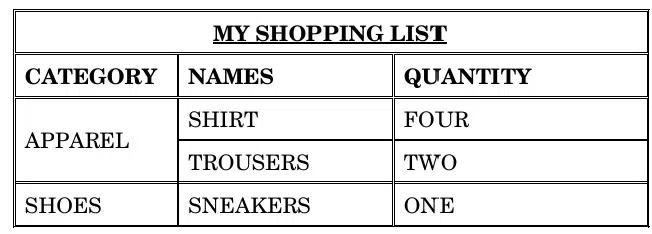
- Specification-1: The text “MY SHOPPING LIST” should be in the top row of the table spanning all three columns.
- Specification-2: The table should have 3 columns and 5 rows, with the first row containing table headings as given in the specification.
- Specification-3: The second row should display the table header, and the next three rows should display the shopping data as shown.
Answer:
<html>
<head>
<title>My Shopping List</title>
</head>
<body>
<table border="1" cellpadding="5" cellspacing="0">

  <!-- Specification 1: Title spanning all 3 columns -->
  <tr>
    <th colspan="3">MY SHOPPING LIST</th>
  </tr>

  <!-- Specification 2: Table headers -->
  <tr>
    <th>CATEGORY</th>
    <th>NAMES</th>
    <th>QUANTITY</th>
  </tr>

  <!-- Specification 3: Shopping data -->
  <tr>
    <td rowspan="2">APPAREL</td>
    <td>SHIRT</td>
    <td>FOUR</td>
  </tr>
  <tr>
    <td>TROUSERS</td>
    <td>TWO</td>
  </tr>
  <tr>
    <td>SHOES</td>
    <td>SNEAKERS</td>
    <td>ONE</td>
  </tr>

</table>
</body>
</html>
41. Write the HTML code to design the web page as shown below:
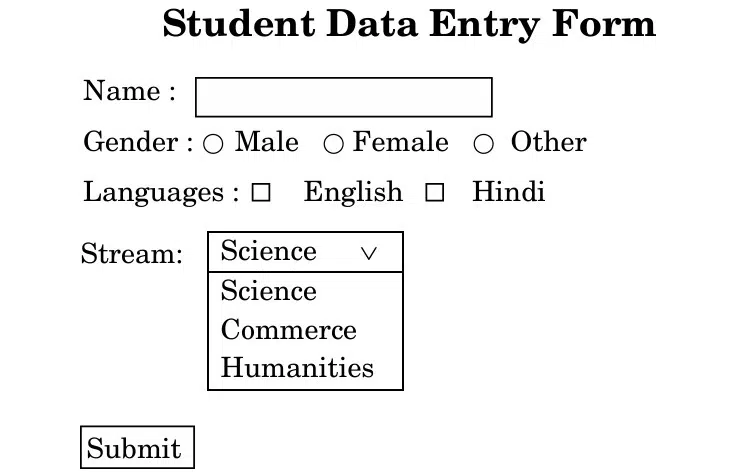
Note:
- The title of the page should be ‘Student Data Entry Form.’
- The heading ‘Student Data Entry Form’ on the web page should be of the largest possible size.
Answer:
<html>
<head>
<title>Student Data Entry Form</title>
</head>
<body>
<h1>Student Data Entry Form</h1>

<form>
  <!-- Textbox for Name -->
  Name: <input type="text" name="studentName"><br><br>

  <!-- Radio buttons for Gender -->
  Gender:
  <input type="radio" name="gender" value="Male"> Male
  <input type="radio" name="gender" value="Female"> Female
  <input type="radio" name="gender" value="Other"> Other
  <br><br>

  <!-- Checkboxes for Languages -->
  Languages:
  <input type="checkbox" name="language" value="English"> English
  <input type="checkbox" name="language" value="Hindi"> Hindi
  <br><br>

  <!-- Dropdown menu for Stream -->
  Stream:
  <select name="stream">
    <option>Science</option>
    <option>Commerce</option>
    <option>Humanities</option>
  </select>
  <br><br>

  <!-- Submit button -->
  <input type="submit" value="Submit">
</form>

</body>
</html>
42. Write the HTML code to design the web page as shown below (the table border should be 1, height = 150, and width = 350 with cellpadding = 15):
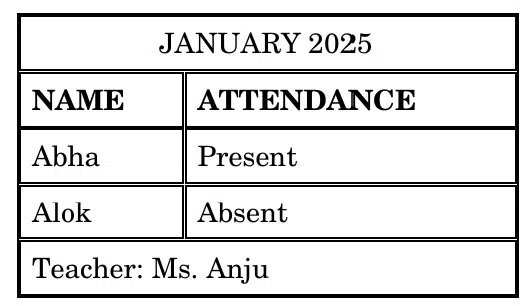
Answer:
<html>
<head>
<title>Attendance - January 2025</title>
</head>
<body>
<h2>JANUARY 2025</h2>

<table border="1" height="150" width="350" cellpadding="15">
  <tr>
    <th>NAME</th>
    <th>ATTENDANCE</th>
  </tr>
  <tr>
    <td>Abha</td>
    <td>Present</td>
  </tr>
  <tr>
    <td>Alok</td>
    <td>Absent</td>
  </tr>
</table>

<p><b>Teacher:</b> Ms. Anju</p>

</body>
</html>
Disclaimer: We have taken an effort to provide you with the accurate handout of “HTML Class 10 Questions and Answers“. If you feel that there is any error or mistake, please contact me at anuraganand2017@gmail.com. The above CBSE study material present on our websites is for education purpose, not our copyrights.
All the above content and Screenshot are taken from Computer Application Class 10 Support material which is present in CBSE Website, CBSE Sample Paper, CBSE Old Sample Paper, CBSE Board Paper which is present in CBSEACADEMIC website This Textbook and Support Material are legally copyright by Central Board of Secondary Education. We are only providing a medium and helping the students to improve the performances in the examination.
Images and content shown above are the property of individual organisations and are used here for reference purposes only. To make it easy to understand, some of the content and images are generated by AI and cross-checked by the teachers. For more information, refer to the official CBSE textbooks available at cbseacademic.nic.in.