
File handling in C++ is an important concept that allows programs to store and retrieve data permanently using files. Instead of losing data after program execution, files help in saving information for future use.
File handling in C++
In computers we have to handle large amounts of data. This data is stored in the files. A file is a collection of related data stored on the disk. The C++ programs are designed to perform read and write operations on these files.
Opening and closing the file
When you want to work with a file, you need to open it first. This you can do using a file stream object from .
Syntax
ofstream outFile;
outFile.open("data.txt");
After finishing your operations, you must close the file for free system resources.
Syntax
outFile.close();File modes in C++
A file mode in C++ is simply the way you tell the program how you want to use a file when you open it. Some of the file modes in C++ are:
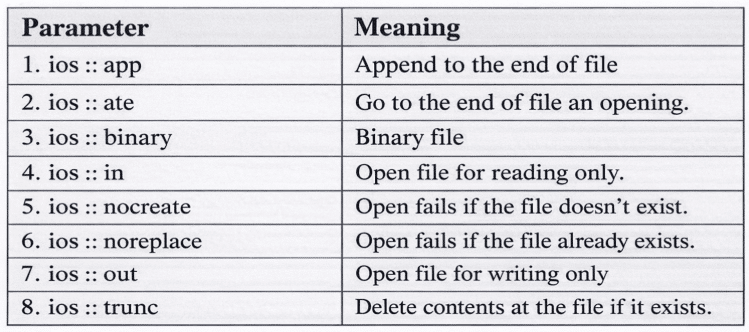
File mode can combine two or more operators using the bitwise OR operator.
Syntax
fout.open("Data",IOS::app, IOS::nocreate);This opens a file named “data” in the append mode but fails to open the file if it doesn’t exist.
Binary FIles
In C++ by default the file stream operations are performed in text mode, but we can store data in binary form. This binary file is not a human-readable text; this text can be read using the program only. The binary file is faster and more efficient for storing complex data. The functions write() and read() are used for this purpose.
Example,
#include <iostream>
#include <fstream>
using namespace std;

struct Student {
    int rollNo;
    char name[50];
    float marks;
};

int main() {
    // Create a student record
    Student s1 = {101, "Rahul", 89.5};

    // Write to binary file
    ofstream outFile("student.dat", ios::binary);
    outFile.write(reinterpret_cast<char*>(&s1), sizeof(s1));
    outFile.close();

    // Read from binary file
    Student s2;
    ifstream inFile("student.dat", ios::binary);
    inFile.read(reinterpret_cast<char*>(&s2), sizeof(s2));
    inFile.close();

    // Display the record
    cout << "Roll No: " << s2.rollNo << endl;
    cout << "Name: " << s2.name << endl;
    cout << "Marks: " << s2.marks << endl;

    return 0;
}
Purpose of seekg() and tellg()
In C++, seekg() and tellg() are the functions used with input file streams (ifstream) to control and check the positions of the “get” pointer—the pointer that determines where the next read operation will happen.
- The Seekg(): Seekg() function sets the pointer to the beginning of the file so that reading would start there. The seekg() takes only one argument.
- tellg(): The tellg() function returns the current position of the get pointer. It helps to know where you are in the file.
Disclaimer: We have provide you with the accurate handout of “File handling in C++“. If you feel that there is any error or mistake, please contact me at anuraganand2017@gmail.com. The above study material present on our websites is for education purpose, not our copyrights.
Images and content shown above are the property of individual organisations and are used here for reference purposes only. To make it easy to understand, some of the content and images are generated by AI and cross-checked by the teachers.