
Data Structure using C++ is a fundamental concept in computer science that focuses on organizing, storing, and managing data efficiently. Using the powerful features of C++, such as classes, pointers, dynamic memory allocation, and object-oriented programming, developers can implement various data structures effectively.
Data Structure using C++
Introduction to Data Structure
Data structures are the backbone of computer science; they help to define how the data is stored, organised and accessed efficiently. It helps to solve problems quickly, reduce memory usage and write optimised programmes.
What is a Data Structure?
A data structure is a method of organising and storing data in a computer so it can be used effectively.
Data structure operations
The data in data structures are processed by certain operations, like
- Traversing: Traversing means visiting each element one by one in a data structure.
- Searching: Searching helps to find the particular record.
- Inserting: Adding a new record to the structure.
- Deleting: Removing a record from a structure.
- Sorting: Arranging the records in some order.
- Merging: Combining the records in two different sorted files into a single sorted file.
What is an array?
An array is a collection of elements stored in a single variable. These elements are stored in continuous memory locations. Each element is accessed using an index number which starts from 0.
For example,
Marks = [85, 90, 78, 92, 88]

Marks[0] - 85
Marks [1] - 90
Marks [2] - 78
Marks [3] - 92
Marks [4] - 88
Array – representation in memory
An array stores elements in contiguous memory locations. This means that all the elements are stored side by side in the memory location. The first element is stored at the base address, and the next element is stored at the address that is calculated using a formula.
Formula to find address
LOC[LA[K]] = Base[LA] + 𝑊 ⋅ (𝐾 − Lower Bound)- LOC[LA[K]] = Address of element at index K
- Base[LA] = Starting address of the array
- W = Number of words per element (usually 4 bytes for integers)
- Lower Bound = Starting index (usually 0 or 1)
Example
Suppose an array is like a row of boxes; each box stores one value, like the number of cars sold. Each box has a –
- An index number
- A memory address
If one array is there called AUTO that stores:
- AUTO[0]: Cars sold in 1998
- AUTO[1]: Cars sold in 1999
- AUTO[2]: Cars sold in 2000
- The base address is 200.
- W (word size) is 4 bytes.
- Lower bound means the first index is = 0.
The formula is:
Address of AUTO[K] = Base + 𝑊 ⋅ (𝐾 − Lower Bound)Step-by-Step Calculation
| Year | Index (K) | Formula | Address |
|---|---|---|---|
| 1998 | 0 | 200 + 4×(0−0) | 200 |
| 1999 | 1 | 200 + 4×(1−0) | 204 |
| 2000 | 2 | 200 + 4×(2−0) | 208 |
Traversing a Linear Array?
Traversing a linear array is a fundamental operation in data structure. Traversing means accessing each element from an array one by one from the first element to the last element for performing some operation like searching, counting or updating values, etc. For example,
Suppose we have the following array:
A = [10, 20, 30, 40, 50]Traversing this array means –
First Visit 10
Then 20
Then 30
Then 40
Then 50
Note: Traversing is usually used when we are using loops like ‘for’ or ‘while’.
Algorithm for traversing a linear array
Let LA = linear array.
LB = lower bound (first position)
UB = upper bound (last position)
Step 1: Set counter K = LB.
Step 2: If K <= UB, go to step 3. Otherwise, stop.
Step 3: Do the required task with LA[K] (like print it).
Step 4: Increase counter: K = K + 1
Step 5: Go back to step 2.
Step 6: Exit when all elements are done.
What is insertion in an array?
You can insert a new element in the array. You can add a new element at the end of the array, but if you want to add any new element in the middle of the array, then you need shifting.
Algorithm for inserting an element into a linear array
LA = array
N = number of elements
K = position where you want to insert
ITEM = new value to insert
Step 1: Set J = N.
Step 2: While J ≥ K, do:
Step 3: Set LA[J+1] = LA[J]
Step 4: Go to the previous element, J = J - 1.
Step 5: Insert the new element, LA[K] = ITEM.
Step 6: Increase size, N = N + 1
Step 7: Exit
Deleting an Element in an Array
If you want to remove any element from the array, if you want to delete any element from the last, it is easy, but if you want to delete any element from the middle, then you have to fill up the empty elements.
Algorithm for deleting an element
LA = array
N = number of elements
K = position of the element to delete
Step 1: Set counter J = K.
Step 2: While J < N, do:
Step 3: Move next element, LA[J] = LA[J + 1]
Step 4: Go to the next position, J = J + 1.
Step 5: Reduce size, set N = N - 1
Step 6: Exit
Bubble Sorting
Bubble Sort is a method where the numbers can be arranged in ascending or descending order. The bubble sort works based on comparing two neighbours and swapping them if they are in the wrong order.
Algorithm of Bubble Sort
Suppose the array is LA with N elements.
Step 1: Set Pass = 1
Step 2: Compare. For each element from 1 to N - Pass:
Step 3: If LA[i] > LA[i+1], swap them.
Step 4: Repeat, Increase Pass = Pass + 1
Step 5: Continue until all passes are done (Pass = N - 1).
Step 6: Exit
Searching
Searching refers to the operation of finding a specific element from the array. The most commonly used searching algorithms are linear search and binary search.
Linear Search Algorithm
LA = array
N = number of elements
ITEM = value to search
Step 1: Set K = 1.
Step 2: While K ≤ N, do:
Step 3: If LA[K] == ITEM, then Found → Stop
Step 4: Else, move to the next, K = K + 1.
Step 5: If the loop ends, the ITEM is not found.
Step 6: Exit
Binary Search Algorithm
LA = sorted array
LB = lower bound (first position)
UB = upper bound (last position)
ITEM = value to search
Step 1: Set LB = 1, UB = N
Step 2: While LB ≤ UB, do:
Step 3: Find the middle, MID = (LB + UB)/2.
Step 4: If LA[MID] == ITEM, then Found, Stop
Step 5: If ITEM < LA[MID], search left, UB = MID - 1. Step 6: If ITEM > LA[MID], search right, LB = MID + 1.
Step 7: Exit
Pointer Arrays
An array whose each element is a pointer is called a pointer array. A pointer array is an array where each element stores an address, not a value. For example,
- int *p[5] -> Pointer array, store address
- int p[5] -> normal array, store value
p[0] = &a[0]; (p[0] stores the address of a[0])
p[1] = &a[1]; (p[1] stores the address of a[1])
Record
A record is a collection of related data items, or you can say that a record is a group of related data items. Each item is called a field. Each data item is termed as a ‘field’. For example, a student record may have name, address, phone and stream. Each field can have a different data type, like text, number, etc.
How to Access Record Items
To access a record item, you can use the dot operator. For example,
Student.name.lastThis means go to student -> then name -> then last name.
Linked List
A linked list is a method to store data in a computer. It is just like a chain of boxes (box is known as node) where each box contain two parts first is data and second is address.

- INFO part: This stores the actual data (like a name or number).
- LINK part: This stores the address of the next box in the chain.
Advantage of Linked List
- A linked list is a dynamic method to store data.
- A linked list can increase or decrease in size anytime.
- No wastage of space
- Insertion and deletion can be done easily.
Representation of a linked list in memory
A linked list is stored in memory using arrays and pointers. The key idea is that each node has two parts.
- INFO[K] → stores the data of node K
- LINK[K] → stores the address (location) of the next node
Tree Data Structure
A tree is a non-linear, hierarchical data structure where each element connects to one or more child nodes. It starts from a single node which is known as the root and connects child nodes using branches. The tree is used for faster searching than the linked list.

- Root: The topmost node with no parent.
- Child: A node directly connected below another node.
- Parent: A node that has one or more children.
- Leaf: A node with no children.
- Siblings: Nodes that share the same parent.
- Ancestor: Any node on the path from the root to a given node.
- Descendant: Any node that comes below a given node.
- Level: Distance from the root (the root is at level 0).
- Left/Right Subtree: Subtrees rooted at the left or right child of a node.

Types of Tree
Three can be classified according to node structure such as –
- Null tree: A tree without node.
- Binary tree: A tree which has left and right children.
- Ordered tree: Children of each node are ordered from left to right.
- Nonordered tree: Children of each node are not ordered from left to right.
Binary Tree
A binary tree is a tree where each node has at most two children. These children are called the left child and the right child. If a node has no children, it is a terminal node.

- A is the root.
- B and C are children of A.
- D, G, H, K are leaf nodes.
- E is parent of H and K.
- D and E are siblings (same parent B).
- G, H, K are descendants of E.
Algebraic Expressions
An algebraic expression is a mathematical phrase that combines numbers (1, 2, 4, etc.), variables (a, b, c, etc.), and operators (+, -, x, ^, etc.). An algebraic expression doesnot have an equals sign (=). It is used in mathematics for simplification. Examples of algebraic expressions are 3x + 5.
Algebraic Expressions as Trees
Expressions can be represented as binary trees where operators are internal nodes and variables are leaf nodes. Example (a – b)2/(c.d + e)

Complete Binary Tree
A complete binary tree is a binary tree where all the levels are completely filled except possibly the last. In the last level, nodes are filled from left to right without gaps.

This is a complete binary tree.
- Levels 0, 1, 2 are full.
- Level 3 has nodes filled from the left (H, I).
Representing a binary tree in memory
There are two ways to represent binary trees in memory –
- Linked Representation
- Sequential Representation
Linked Representation
In the method we use three parallel arrays to store the tree INFO, LEFT and RIGHT.
- INFO[K] contains the data at node N.
- LEFT[K] contains the location of the left child of node N.
- RIGHT[K] contains the location of right child of node N.
- ROOT will contain the location of root R of T. It is a pointer variable
- If any subtree is empty, then the corresponding pointer will contain a null value.
Sequential Representation
In this method, we store the binary tree in an array instead of a linked list. The position of each node is fixed based on its level in the tree. For a node stored at position K in the array:
- Left child: stored at position 2 * K
- Right child: stored at position 2 * K + 1
- Parent: stored at position K / 2
What is stack?
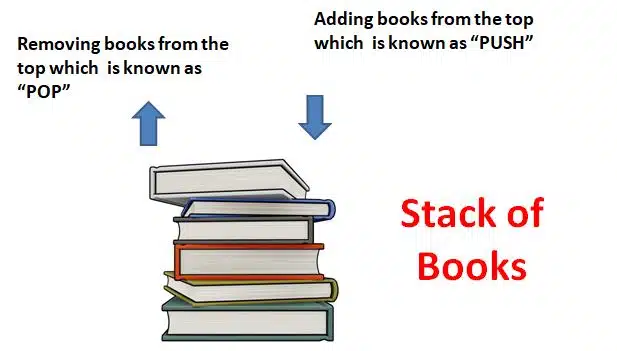
A stack is a linear data structure which allows adding and removing elements in a Last In, First Out order. This means that the recently added elements will be removed first. For example, with multiple books on the table in stack position, you can add or remove a books from the top, which is known as Last In, First Out.
Why we use a Stack
- Stack helps to manage the data in a Last In, First Out method.
- It helps to handle memory allocation.
- Managing browser history
- Compilers and interpreters use the stack method for converting them into machine language.
Disclaimer: We have provide you with the accurate handout of “Data Structure using C++“. If you feel that there is any error or mistake, please contact me at anuraganand2017@gmail.com. The above study material present on our websites is for education purpose, not our copyrights.
Images and content shown above are the property of individual organisations and are used here for reference purposes only. To make it easy to understand, some of the content and images are generated by AI and cross-checked by the teachers.