
C++ is a powerful programming language widely used for developing software, games, and system applications. To write programs in C++, it is important to understand its basic building blocks such as data types, operators, and tokens. Data types define the type of data a variable can store, operators are used to perform operations on data, and tokens are the smallest elements of a C++ program recognized by the compiler. These concepts form the foundation of C++ programming and help in writing efficient and error-free programs.
C++ Programming – Data Types, Operators, Tokens
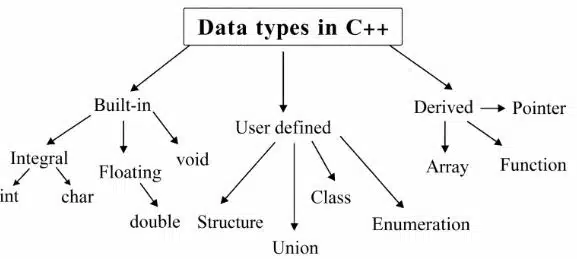
A data type in C++ specifies the type of data that a variable can store. It tells the compiler how much memory to allocate and what kind of value will be stored. In C++ data types are categorised into three types:
- Built-in data types
- User defined data type
- Derived data type
1. Built-in data types
| Data Type | Size (bytes) | Description | Example |
|---|---|---|---|
| int | 2 | Stores whole numbers | 10, -25 |
| float | 4 | Stores decimal numbers | 3.14 |
| double | 8 | Stores large decimal numbers | 45.6789 |
| char | 1 | Stores a single character | ‘A’ |
| bool | 1 | Stores true or false values | true |
| void | No Size | Represents no value | void function |
Type Modifiers
Type modifiers are words used with data types to change their size or what values they can store. They are used with:
- int
- char
- unsigned: Stores only positive values (0 and positive numbers). It does not use a sign bit.
- long: It stores larger values than base types.
- Short: It stores a smaller range of value.
- const: A value cannot be changed during program execution.
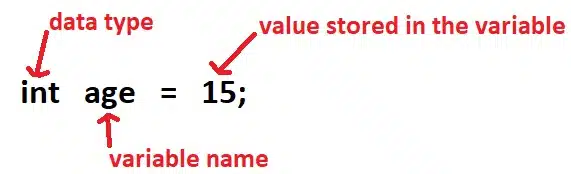
Variable
A variable is a name given to a memory location that stores data and its value. A variable is also known as a container, which helps to contain the data and value.
Example,
Rules for Naming Variables in C++
- Start with a letter or underscore; never start with a digit.
- No spaces or special symbols are allowed.
- Case-sensitive, like ‘Age’ and ‘age’ are different.
- Don’t use reserved words like ‘int’, ‘class’, and ‘return’.
Constants
In C++, constants are the fixed values that cannot be changed during the execution. They are declared using const and helpful for protecting important values.
- Example: const float Pi = 3.14;
Types of constants
There are different types of constants:
a. Integer constant
Integer constants have a fixed integer value.
- Example: const int i = 10;
b. Character constant
Character constants have a fixed character value stored as ASCII code.
- Example: const char a = ‘t’;
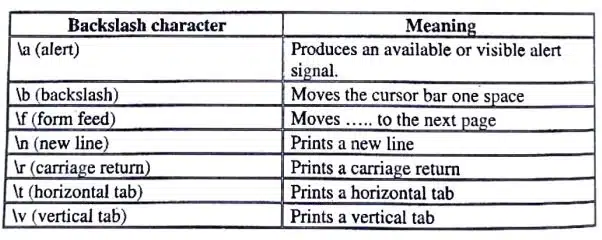
Escape sequences (special meanings with ):
c. Floating-point constant
The real numbers can use exponential notation.
- Example: const double pi = 3.14;
d. String constant
A string constant stores a sequence of characters in double quotes.
- Example: const char str = “abcde”;
e. Hexadecimal & Octal constants
The octal number starts from 0 to 7. Hexadecimal numbers start from 0 to 9 and A to F.
- Example of octal constant: const int num = 0156;
- Example of hexadecimal constant: const int num = 0xAB;
Defined Constants
In C++, #define is a preprocessor directive used to create a constant value or macro before the program is compiled. #defined is used for writing a value which can be used anywhere in the program.
Example,
#define PI 3.14Now this PI variable can be used anywhere in the program instead of writing a value again and again.
Symbolic Constants in C++ – Enumerations
In C++, enumeration is used to create our own data type. An enumeration is a way to define a group of named integer constants. To make the program:
- Easy to read
- Easy to manage related values
- Less error-prone
Example,
enum Direction { North, South, East, West };By default, North = 0, South = 1, East = 2, West = 3.
Compiler Tokens
A compiler token is the smallest individual unit of a C++ program that the compiler recognises. The C++ program is made of different types of tokens.
- Keywords
- Literals
- Identifiers
- Operator
- White Space & Comments
1. Keywords
Keywords are the reserved words which have a special meaning, like ‘int’, ‘return’, ‘class’, etc. These keywords are not allowed to be used as variable names. There are 48 different types of keywords.
break, char, class, const, int, return, default, delete, do, double, etc.
2. Literals
Literals have fixed values written directly in code. Literal may be a character constant, integer constant, floating-point constant, or string constant.
3. Identifiers
The identifier is the name given to variables, functions, classes, etc. The identifiers always start from a letter or underscore; no keyword is used as an identifier.
Rules for Naming identifier
- Letters (A–Z, a–z), digits (0–9), and the underscore (_) are allowed.
- Must begin with a letter or underscore, never a digit.
- Identifiers have a case sensitivity, meaning ‘Age’ and ‘age’ are different in identifiers.
- No spaces or special symbols are allowed, like ‘$’, ‘#’, ‘%’, or whitespace.
- Cannot use reserved words like ‘int’, ‘class’, or ‘return’.
- No strict limit, but some compilers only consider the first 31–32 characters.
4. Operators
The symbols that perform operations are called operators, like +, -, *, =, ==, &&, || etc.
a. Arithmetic operator
Arithmetic operators are used for mathematical calculations. There are different types of arithmetic operators.
Unary arithmetic operator
A unary arithmetic operator has only one operand.
| Operator | Meaning | Example |
|---|---|---|
| + | Positive operator | +a |
| – | Negative operator | -a |
Binary arithmetic operator
In binary arithmetic, operators have 2 operands.
| Operator | Meaning | Example |
|---|---|---|
| + | Addition | a + b |
| – | Subtraction | a – b |
| * | Multiplication | a * b |
| / | Division | a / b |
| % | Modulus (remainder) | a % b |
Ternary arithmetic operator
A ternary arithmetic operator needs 3 operands. This is one of the special features of the C++ language.
condition ? expression1 : expression2;Example,
(a > b) ? a : b;
It will return largest value.
b. Increment and Decrement Operators
Sometimes we need to increase or decrease the value of a variable by 1. In C++ you can do this with the help of increment and decrement operators. This operator is known as a unary operator because it works on only one operand.
- ++ → Increment operator
- — → Decrement operator
Types of Increment and Decrement
- Prefix Operator: In a prefix operator, the first changes the value, then takes the new value for processing. example, ++a
- Postfix Operator: In this first take the value of the variable, then increment or decrement, can be done. example, a++
| Expression | Meaning | Value Used | Final Value |
|---|---|---|---|
| ++a | Prefix Increment | 6 | 6 |
| a++ | Postfix Increment | 5 | 6 |
| –b | Prefix Decrement | 4 | 4 |
| b– | Postfix Decrement | 5 | 4 |
c. Relational operator
These operators are used to test the relation between 2 values. All C++ operators are binary operators because they require 2 operands. The relational operator returns 0 when the relation is false and returns 1 when the condition is true.
| Operator | Symbol | Form | Result |
|---|---|---|---|
| Less than | < | a < b | Returns 1 if a is less than b otherwise 0 |
| Grater than | > | a > b | Returns 1 if a is greater than b otherwise 0 |
| Less than or equal to | <= | a <= b | Returns 1 if a is less than or equal to b otherwise 0 |
| Greater than or equal to | >= | a >= b | Returns 1 if a is greater than or equal to b otherwise 0 |
| Equal to | == | a == b | Returns 1 if both are equal (same) |
| Not equal to | ! = | a != b | Returns 1 if both values are not equal |
d. Logical operators
The logical operator is used to combine the result of one or more expressions, and the resultant expression is called a logical expression.
| Operator | Symbol | Form | Result |
|---|---|---|---|
| Logical AND | && | a && b | Return 1 if a and b are nonzero else return 0 |
| Logical OR | || | a || b | Return 1 if a or b is nonzero, else 0 |
| Logical negation | ! | ! a | Return 1 if a is zero else returns 0 |
e. Conditional operator (?:)
It is a ternary operator taking 3 arguments. The operator is used to check if the condition is true or false. It is similar to an if…else control statement.
| Operator | Symbol | Form | Result |
|---|---|---|---|
| Conditional | ? : | a ? b : c | If a is nonzero, result is b, otherwise it is c |
f. Assignment operator (=)
The assignment operator is used to store the right-hand side value in the left-hand side operand.
Example,
int num = 5;g. Shorthand (compound) operators
Shorthand operators are used to perform an operation and assignment in a single statement.
| Operator | Symbol | Form | Operation |
|---|---|---|---|
| Add-assign | += | a += b | Equivalent to a = a + b |
| Subtract-assign | -= | a -= b | Equivalent to a = a – b |
| Multiply-assign | *= | a *= b | Equivalent to a = a * b |
| Divide-assign | /= | a /= b | Equivalent to a = a / b |
| Remainder-assign | %= | a %= b | Equivalent to a = a % b |
h. Bitwise operator
Bitwise operators perform operations on the binary bits of integer values. These operators work bit-by-bit. They can be used only with the integral built-in data type, i.e., in connection with char or int.
| Operator | Form | Meaning |
|---|---|---|
| ~ | ~ a | One’s complement |
| >> | a >> b | Right shift a by b |
| << | a << b | Left shift a by b |
| & | a & b | Bitwise AND |
| | | a | b | Bitwise OR |
| ^ | a ^ b | Bitwise XOR |
i. Operators dealing with stream
- Insertion operator (<<): This operator is used with “cout” and helps to display the output on the screen. Example: count << a;
- Extraction operator (>>): This operator is used with “cin” and helps to take input from the keyboard. Example: cin>>a;
j. Comma operator
The comma operator is used to combine multiple expressions into one expression using the comma operator.
Example,
int num=5, num1=6;k. The sizeof Operator
The sizeof operator helps to calculate the size of any data item or type. It takes a single operand, which may be a type name (e.g., ‘int’) or an expression (e.g., ‘100’), and returns the size of the specified entity in bytes.
Example,
cout << "char size =" << sizeof(char);l. Scope resolution operator
The scope resolution operator (::) in C++ is used to specify the scope of a variable, function, or class member. It helps the compiler identify whether a variable belongs to the global scope or to a particular class. It is commonly used when a local variable and a global variable have the same name.
Example,
Syntax :: variable_name;m. Memory Management Operators (new, delete)
Memory management operators in C++ are new and delete. The new operator is used to dynamically allocate memory during program execution, while the delete operator is used to free that allocated memory.
int *p = new int;      // memory allocation
delete p;      // memory free
n. typecast operator
The typecast operator is used to convert one data type into another data type in C++. It helps in changing the type of a variable temporarily during execution. There are two types of conversion methods:
Implicit Type Conversion (Simple Type Conversion)
This is done automatically by the compiler without the programmer’s help. It usually converts a smaller data type into a larger data type to avoid data loss.
Example,
int a = 10;
float b;
b = a;       // int value converted into float (automatic conversion)
Explicit Type Conversion (Type Casting)
This is done manually by the programmer using a cast operator. It is used when we want to forcefully convert one data type into another.
Example,
int a = 10, b = 3;
float result = (float)a / b;
o. stream manipulation operators
Stream manipulation operators are used to change the format of output in C++. They help us make the output neat and readable.
- dec: Sets base-10 integers.
- endl: Sends a new line character.
- Ends: Sends a null (end of string) character.
- flush: Flushes an output stream.
- Hex: sets base-16 integers.
- Oct: Sets base-8 integers.
- setw(int): Sets field width.
Comments in C++
Comments in C++ are lines of text written in a program that are ignored by the compiler. They are used to explain the code and make it easier to understand. In C++ there are two types of comments:
Single-line comment
The single-line comment is used for writing a comment in one line.
Syntax:
// This is a single-line commentMulti-line Comment
The multi-line comment is used to write comments in multiple lines.
Syntax:
/*
This is a multi-line comment.
It can span multiple lines.
*/
Scope and Visibility in C++
Scope means the part of a program where a variable can be used or accessed. It tells where a variable is visible in the program.
Type of Scope in C++
1. Local Scope
A variable declared inside the function or block { } is known as local scope.
Example,
void main()
{
int x = 10; // local variable
}
2. Global Scope
A variable declared outside the functions is known as global scope.
Example,
int x = 10; // global variable

void main()
{
cout << x;
}
Disclaimer: We have provide you with the accurate handout of “C++ Programming – Data Types, Operators, Tokens“. If you feel that there is any error or mistake, please contact me at anuraganand2017@gmail.com. The above study material present on our websites is for education purpose, not our copyrights.
Images and content shown above are the property of individual organisations and are used here for reference purposes only. To make it easy to understand, some of the content and images are generated by AI and cross-checked by the teachers.