
In C++, handling data is not limited to variables and memory—programs often need to store and retrieve information from files. This is where files and streams come into play. A file is a collection of data stored on a storage device, while a stream is a flow of data between a program and a file or input/output device.
Files and Streams in C++
In C++, streams help to store data in the file using the library. The stream provides three main classes: ifstream for reading, ofstream for writing, and fstream for both reading and writing. This allows you to store data permanently in the file instead of just in memory.
The extraction operator (>>) is used with input streams like cin and ifstream to read formatted data from a stream into variables. The extraction operator automatically skips whitespace, tabs, and newlines while reading.
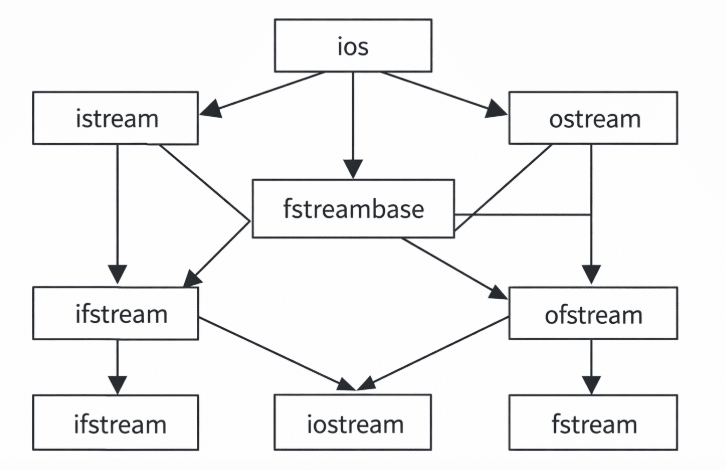
Ifstream is specifically used to create input file streams for reading data from the disk files. The stream class hierarchy is built on ios (input/output stream base class), with istream and ostream as its main derived classes. ifstream, ofstream, and fstream extend these to handle file input and output.
Stream class hierarchy:
Program how to write to a file and then read from it:,
#include <iostream>
#include <fstream>
using namespace std;

int main() {
    // Write to a file
    ofstream out("test.txt");
    out << "Hello File!";
    out.close();

    // Read from the file
    ifstream in("test.txt");
    string text;
    in >> text;   // reads the first word
    cout << text; // prints "Hello"
    in.close();

    return 0;
}
End of File (EOF)
EOF stands for End of File. When you read the data from a file using ifstream or from input using cin, the EOF helps to check whether the file has ended or not. When the file ends, the stream sets an EOF flag to indicate that no more input is available.
#include <iostream>
#include <fstream>
using namespace std;

int main() {
    ifstream file("data.txt");   // open file for reading
    string word;

    // Read until EOF
    while (file >> word) {
        cout << word << endl;
    }

    file.close();
    return 0;
}
Character I/O
The character I/O helps to read and write one character at a time, typically used in standard input/output streams.
Key Functions for Character I/O in C++
Character Input
- cin.get(): Reads a single character from input.
Character Output
- cout.put(): Writes a single character to output.
#include <iostream>
using namespace std;

int main() {
    char ch;
    cout << "Enter a character: ";
    ch = cin.get();   // Character Input
    cout << "You entered: ";
    cout.put(ch);     // Character Output
    return 0;
}
Disclaimer: We have provide you with the accurate handout of “Files and Streams in C++“. If you feel that there is any error or mistake, please contact me at anuraganand2017@gmail.com. The above study material present on our websites is for education purpose, not our copyrights.
Images and content shown above are the property of individual organisations and are used here for reference purposes only. To make it easy to understand, some of the content and images are generated by AI and cross-checked by the teachers.