
The Impressive Web Designing Class 11 Exercise Solutions are prepared to help HSC students understand textbook questions and answers in a simple and systematic manner. These solutions are strictly based on the Maharashtra State Board (HSC) Information Technology syllabus and are written according to the latest exam pattern.
Impressive Web Designing Class 11 Exercise Solutions
Q.1 Answer the Following :
1. The data entry operator wants to insert.
- Photograph
- Write remarks about the photograph
- Underline the heading.
He will use :
1) <Image>
2) <Text>
3) <TextArea>
4) <Img>
5) <UL>
6) <U>
Select the correct tags from the above and arrange in the sequence
Answer:
- <img> – To insert the photograph
- <textarea> – To write remarks (multi-line text)
- <u> – To underline the heading
2. Identify the logical operators in the JavaScript.
1) OR
2) AND
3) | |
4) &
5) &&
6) ++
Answer:
- || – OR
- && – AND
- ! – NOT
Q.2 Complete the following Activity :
1. State atleast three attributes of <Input>
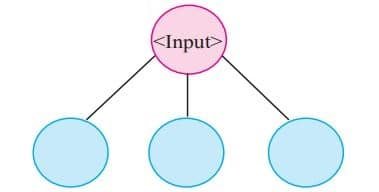
Answer: type, name and value
2.
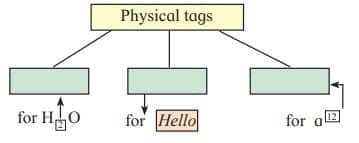
Answer:
- <sub> – Used for subscript text (e.g., H<sub>2</sub>O)
- <i> – Used for italic text (e.g., Hello)
- <sup> – Used for superscript text (e.g., a<sup>12</sup>)
3. Group the following.
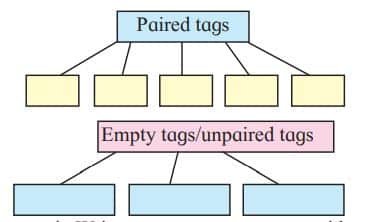
Answer:
Paired Tags (Need opening and closing)
- <b>…</b> – Bold text
- <i>…</i> – Italic text
- <u>…</u> – Underlined text
- <p>…</p> – Paragraph
- <h1>…</h1> – Heading
Empty Tags / Unpaired Tags (No closing tag)
- <br> – Line break
- <hr> – Horizontal line
- <img> – Image tag
4. Write operator names with symbol in boxes.
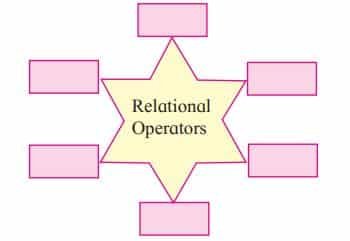
Answer:
| Operator Name | Symbol |
|---|---|
| Greater than | > |
| Less than | < |
| Greater than or equal | >= |
| Less than or equal | <= |
| Equal to | == |
| Not equal to | != |
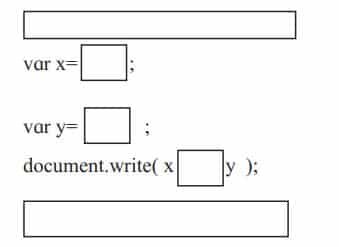
5. Complete following program to display multiplication of 6.40 and 300.
<!DOCTYPE html>
<html>
<head><title> Series </title></head>
<body>
</body>
</html>
Answer:
<!DOCTYPE html>
<html>
<head><title>Series</title></head>
<body>

<script>
var x = 6.40;
var y = 300;
document.write( x * y );
</script>

</body>
</html>
Q.3 Find out error if any in following javascript code.
var length ,breadth;
length=4.5;
breadth=6;
area=1/2*length*breadth;
document.write(“Area of triangle is”area);
Answer:
<script>
var length, breadth;
length = 4.5;
breadth = 6;
var area = 0.5 * length * breadth;
document.write("Area of triangle is " + area);
</script>
Q.5 Trace the output of following html code.
<!DOCTYPE html>
<html>
<head>
<title>Heading tags</title></head>
<body>
<h1 align=left>Information Technology</h1>
<hr>
<h2 align=center>XI Standard</h2>
<h3 align=right>Division</h3>
</body>
</html>
Answer:
- Heading 1 (H1): Displays “Information Technology” aligned to the left.
- Horizontal Rule (<hr>): A straight horizontal line appears below H1.
- Heading 2 (H2): Displays “XI Standard” aligned to the center.
- Heading 3 (H3): Displays “Division” aligned to the right.
Q.6 Discuss the following and Answer the questions.
1) A Jr. web designer wants to design a webpage to enter the employee name, address. He needs a button to clear the form content and submit the data
- Write the different controls he will use to create the web page.
- State the tags to be used for the controls.
Answer:
- Text box for Employee Name
- Tag: <input type=”text” name=”empname”>
- Text area for Address
- Tag: <textarea name=”address” rows=”4″ cols=”30″></textarea>
- Submit button (to send data)
- Tag: <input type=”submit” value=”Submit”>
- Reset button (to clear form content)
- Tag: <input type=”reset” value=”Clear”>
2) A teacher has asked a student to create a web page to accept number and check whether it is between 50 to 100.
- List the variable, operators to be used.
- Specify the built-in function used and structure used.
Answer:
1. Variables to be Used
- num → to store the number entered by the user
2. Operators to be Used
Relational operators:
- = (greater than or equal to)
- <= (less than or equal to)
Logical operator:
- && (AND) → ensures both conditions are true
Q.7 Create webpages for the following.
1) Write a program using HTML to design your class Time Table.
Answer:
<!DOCTYPE html>
<html>
<head>
<title>Class Time Table</title>
</head>
<body>
<h2 align="center">Class Time Table</h2>
<table border="1" align="center" cellpadding="10">
<tr>
  <th>Day</th>
  <th>9-10</th>
  <th>10-11</th>
  <th>11-12</th>
  <th>12-1</th>
</tr>
<tr>
  <td>Monday</td>
  <td>Math</td>
  <td>English</td>
  <td>Science</td>
  <td>History</td>
</tr>
<tr>
  <td>Tuesday</td>
  <td>Physics</td>
  <td>Math</td>
  <td>Geography</td>
  <td>Computer</td>
</tr>
<tr>
  <td>Wednesday</td>
  <td>Chemistry</td>
  <td>Biology</td>
  <td>English</td>
  <td>Economics</td>
</tr>
</table>
</body>
</html>
2) Write a program using HTML to create a form and submit it with personal data like name, address and standard.
Answer:
<!DOCTYPE html>
<html>
<head>
<title>Personal Data Form</title>
</head>
<body>
<h2>Personal Information</h2>
<form>
  Name: <input type="text" name="name"><br><br>
  Address: <textarea name="address" rows="4" cols="30"></textarea><br><br>
  Standard: <input type="text" name="standard"><br><br>

  <input type="submit" value="Submit">
  <input type="reset" value="Clear">
</form>
</body>
</html>
3) Write a javascript program to accept two numbers and perform addition of two numbers by using mouseover event
Answer:
<!DOCTYPE html>
<html>
<head>
<title>Addition using Mouseover</title>
</head>
<body>

<script>
function addNumbers() {
    var a = parseFloat(prompt("Enter first number:"));
    var b = parseFloat(prompt("Enter second number:"));
    var sum = a + b;
    document.write("Addition of two numbers is: " + sum);
}
</script>

<h2 onmouseover="addNumbers()">Hover here to perform addition</h2>

</body>
</html>
Q.8 Complete the following.
Answer:
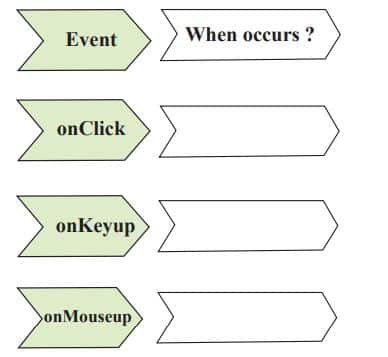
- onClick: When the user clicks on an element (e.g., button, link)
- onKeyup: When the user releases a key after pressing it
- onMouseup: When the user releases the mouse button after clicking
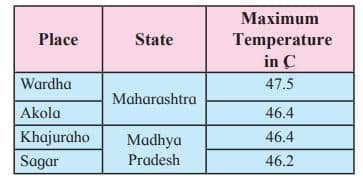
Q.9 Write HTML Code for the following table.
Answer:
<!DOCTYPE html>
<html>
<head>
  <title>Maximum Temperatures</title>
</head>
<body>
  <h2>Maximum Temperatures in India</h2>
  <table border="1" cellpadding="8">
    <tr>
      <th>Place</th>
      <th>State</th>
      <th>Maximum Temperature in °C</th>
    </tr>
    <tr>
      <td>Wardha</td>
      <td>Maharashtra</td>
      <td>47.5</td>
    </tr>
    <tr>
      <td>Akola</td>
      <td>Maharashtra</td>
      <td>46.4</td>
    </tr>
    <tr>
      <td>Khajuraho</td>
      <td>Madhya Pradesh</td>
      <td>46.4</td>
    </tr>
    <tr>
      <td>Sagar</td>
      <td>Madhya Pradesh</td>
      <td>46.2</td>
    </tr>
  </table>
</body>
</html>
Q.10 Multiple choice one correct answer.
1) The default method of submitting form data is…………..
a) Post
b) Get
c) Submit
d) Reset
Answer: b) Get
2) In JavaScript the post increment operator is …………..
a) x++
b) x–
c) –x
d) ++x
Answer: a) x++
Disclaimer: We have provide you with the accurate handout of “Impressive Web Designing Class 11 Exercise Solutions“. If you feel that there is any error or mistake, please contact me at anuraganand2017@gmail.com. The above study material present on our websites is for education purpose, not our copyrights.
All the above content and Screenshot are taken from Information Technology Class 11 Textbook and MSBSHSE (HSC) Support Material which is present in MSBSHSE (HSC) website, This Textbook and Support Material are legally copyright by Maharashtra State Bureau of Textbook Production and Curriculum Research, Pune. We are only providing a medium and helping the students to improve the performances in the examination.
Images and content shown above are the property of individual organisations and are used here for reference purposes only. To make it easy to understand, some of the content and images are generated by AI and cross-checked by the teachers. For more information, refer to the official website.