
A map is a symbolic representation of a region. A map helps find the shortest route for a journey or search for a location such as schools, colleges, hospitals, hotels, etc. Today millions of people use OpenStreetMap. In the map editor we have to draw or trace buildings, roads, etc. with the help of an aerial view taken from a satellite or drone. Such a set of images is called asimagery.
Open Street Map Class 12 Notes HSC
Start contributing to mapping roads, shops, etc.
- Go to openstreetmap.org and open an account.
- Log in to your account.
- Open the tutorial from the Help menu.
- Switch the view between Satellite (Aerial) and Standard Map
- There are three important edit types:
- First is Point of Interest (POI), like a shop, café, chemist, etc.
- Second is Line (road, foot over bridge, pipelines, etc.).
- Third is area (park, building, lake, pond, playground, etc.),
- Start mapping > Search familiar place > Identify building > Add name/details.
- Draw missing areas > Use the Area tool > mark buildings, gardens, and playgrounds
- Add POIs > Place points for shops and services > Tag correctly
- Save work > Click Save > Add short comment > Changeset created
Mapping Basics
Most of the information on the map is in the form of basic elements such as points (nodes), lines (paths or ways) and areas (shapes).
- Point or Node: A point/node is the smallest object on a map. It can mark a Point of Interest (POI) like a shop, café, tree, or lamp-post. Each point is given tags for details and has unique latitude and longitude coordinates to show its exact location.
- Lines or Ways: More complex objects like roads, rivers, and boundaries are shown using Ways (lines or paths). Ways are the lines connected by nodes.
- Areas: There are areas like buildings, parks, playgrounds, and lakes on the map. They are represented by closed ways. Thus, when the first and the last nodes of a way coincide, we get an area.
- Relation: a few objects on the map need a special type of element, such as Relation, to describe them. Relation is a combination of one or more of the basic elements, viz., point, line, and area.
Tagging
A tag in OSM is a kind of label which describes the geographical object on the map in a uniform way. A tag is always given as a key-value pair. More precisely, key=value (K=V). Key represents a specific feature, and value is the proper description of the feature. Only ASCII and lowercase characters are used in keys. Underscore (_) is used for space.
Tasking Managers
Tasking Manager is a free and open-source software tool which divides the mapping work of a certain area into small pieces (tiles) and distributes these tiles among mappers. The idea was first introduced by the Humanitarian OpenStreetMap Team (HOT) to support coordinated mapping efforts.
MapRoulette
A game-like tasking manager called MapRoulette is developed to increase participation. You can compete with other mappers by completing as many tasks as possible. The MapRoulette site provides a set of challenges to work on. You can enjoy the MapRoulette’s game-like experience and at the same time give your valuable contribution to the world.
Java Open Street Map (JOSM) Editor
JOSM is a portable desktop application. Just download the jar file and execute. Java Runtime Environment (JRE) is required to run JOSM. The main advantage of the JOSM editor is that it allows offline editing.
Android Apps for OSM Editing
With the increasing popularity of Android-based smartphones, many applications have been created to assist you in contributing to OSM. We take a quick overview of the most useful apps for mappers.
- OsmAnd: It is an offline navigation app with voice guidance. OSM editor, but one can add and upload POIs. Also, you can record and upload GPX files easily.
- Vespucci: It is a fully fledged OSM editor. It works like JOSM. A full-featured OpenStreetMap (OSM) editor for smartphones. Similar to JOSM.
Opening hours
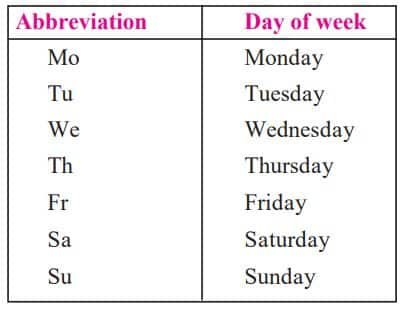
Opening hours is often important information for the map user. Small shops, supermarkets, parks, chemists, etc., are open at certain times of the day. There is a standard format in which this information is filled in on OpenStreetMap.
Disclaimer: We have provide you with the accurate handout of “Open Street Map Class 12 Notes HSC“. If you feel that there is any error or mistake, please contact me at anuraganand2017@gmail.com. The above study material present on our websites is for education purpose, not our copyrights.
All the above content and Screenshot are taken from Information Technology Class 12 Textbook and MSBSHSE (HSC) Support Material which is present in MSBSHSE (HSC) website, This Textbook and Support Material are legally copyright by Maharashtra State Bureau of Textbook Production and Curriculum Research, Pune. We are only providing a medium and helping the students to improve the performances in the examination.
Images and content shown above are the property of individual organisations and are used here for reference purposes only. To make it easy to understand, some of the content and images are generated by AI and cross-checked by the teachers. For more information, refer to the official website.