
Control with Conditionals Class 6 Notes, In computer programming, control with conditionals helps a program take decisions based on certain conditions. Just like we make decisions in daily life (for example, if it rains, we take an umbrella), computers also follow if–then–else logic to perform different actions.
Control with Conditionals Class 6 Notes
Arranging blocks
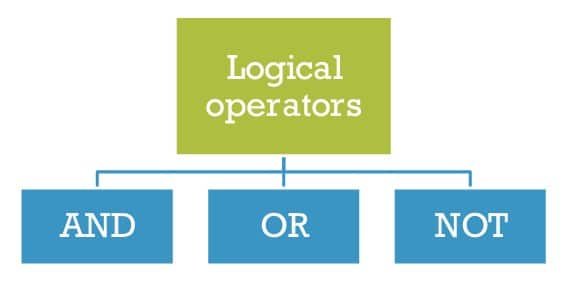
Every day we take decisions based on the situation. In programming also we have to make decisions. Logical operators like AND, OR, and NOT are helpful operators, or they are fundamental blocks that can be used to build a decision-making capability in your code. We can do things conditionally in our programs using if statements or if/else statements combined with logical operators. Logical operators work like Boolean variables and return either TRUE or FALSE. The three most important logical operators are AND, OR, and NOT.
What is an if/else statement?
An if/else statement helps to check whether the condition is true or false. If helps to check the condition, and else helps to do if the condition is false.
Syntax:
if condition:
    # Do this if the condition is true.
else:
    # Do this if the condition is false.
1. And operator
The AND operator is basically used when two different conditions are true. If all the conditions are true, the AND operator returns TRUE. If any one of the conditions fails, the AND operator returns FALSE. In some programming languages, the AND operator is denoted by the “&&” symbol.
For example, you should go to bed only after you have completed your homework and the time is past 8 PM. How we can write the pseudocode—see the example below.

2. OR Operator
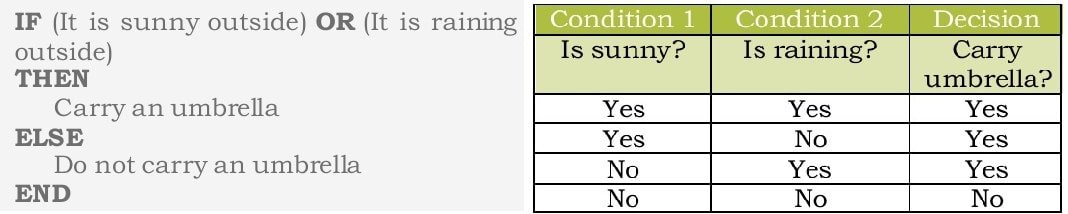
The OR operator is used to determine if either one of two or more conditions is TRUE. If any of the conditions are true, the OR operator returns TRUE. If all the conditions fail, the OR operator simply returns FALSE. In some programming languages, the OR operator is denoted by the “||” symbol.
For example – We should carry an umbrella when either it is sunny, or it is raining. Otherwise, we should not carry it. How we can write the pseudocode—see the example below.
3. NOT Operator
We use the NOT operator to reverse or negate a condition. If the condition is true, NOT will return false and vice versa. In some programming languages, the NOT operator is denoted by the “!” symbol.
For example, you can go to play only if it is not raining, otherwise, you must stay indoors. How we can write the pseudocode—see the example below.

Combining logical operators
Sometimes, we need to combine different logical operators to create a complex expression. Imagine your library is open on Monday between 10 AM and 12 PM OR on Wednesday between 3 PM and 5 PM.

Relational operators
Relational operators are symbols in programming used to compare two values, producing a result of either true or false.

Nested Conditional Statements
If single if-else loop is not enough to check multiple condition, then Nested If statement can be used. Suppose we want to check if a number is divisible by 2 or 3 or both 2 and 3. In this case, we first need an IF condition to check if the number is divisible by 2. Within that condition, we can implement another IF condition to check if the
number is divisible by 3 or not. By doing so, we can check the divisibility of the number.
Objective Type Questions
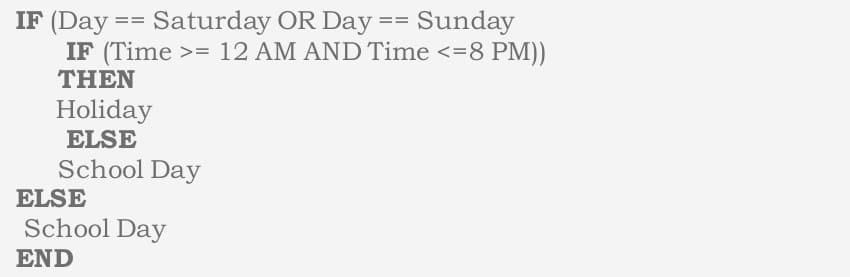
Using the below pseudocode answer the following questions (Question 1-4):
1. Today is Monday and the time being 11.30 AM. Is today a school day?
a. True
b. False
2. Today is Saturday and the time being 1.30 AM. Is today a Holiday?
a. True
b. False
3. Today is Wednesday and the time is 5.30 AM. Is today a school day?
a. True
b. False
4. Today is Sunday and the time being 09.30 PM. Is today a Holiday?
a. True
b. False
5. Logical operators can be used to make decisions in our code
a. True
b. False
6. Which operator is used if the statement evaluates true only if both the expressions are true
a. And
b. Or
c. Not
d. None of the above
7. Which operator is used if the statement evaluates true only if only one of the expressions is true
a. And
b. Or
c. Not
d. None of the above
8. Which of the following operator is used to reverse or negate a condition
a. And
b. Or
c. Not
d. None of the above
9. Based on the flowchart Are you a teen, let us now try to answer the below questions.
a. And
b. Or
c. Not
d. None of the above
10. Your father’s age is 35. In which category will he fall?
a. Child
b. Teenager
c. Adult
d. None of the above
11. Your sister’s age is 19. In which category will she fall?
a. Child
b. Teenager
c. Adult
d. None of the above
12. What are the different types of logical operators? Explain with examples.
Answer: The main logical operators are AND (&&), OR (||), and NOT (!). They help combine or negate conditions in decision-making.
- And operator: AND operator is used to determine if two or more conditions are true.
- OR Operator: The OR operator is used to determine if either one of two or more conditions is TRUE.
- NOT Operator: We use the NOT operator to reverse or negate a condition. If the condition is true, NOT will return false and vice versa.
13. Explain with example on how to combine different logical operators.
Answer: You can nest and combine multiple logical operators to build complex conditions.
if ((day == "Saturday" || day == "Sunday") && time <= 8):
    print("Holiday")
else:
    print("School Day")
14. Write the pseudocode using logical operators to decide if today is a school day or not.
- Monday-Friday: School day;
- Sunday: Holiday;
- 1st and 3rd Saturday: Holiday;
- 2nd and 4th Saturday: School day)
Answer:
IF (day == "Sunday")
    THEN
        Holiday
ELSE IF (day == "Saturday")
    IF (weekNumber == 1 OR weekNumber == 3)
        THEN
            Holiday
    ELSE IF (weekNumber == 2 OR weekNumber == 4)
        THEN
            School Day
ELSE
    School Day
END
15. Create an if-else block with a NOT condition and set two different background colors on the controller.
Answer:
IF NOT (controllerColor == "Red")
    SET controllerColor = "Blue"
ELSE
    SET controllerColor = "Green"
END
16. Create an if-else block with an OR condition and set two different background images on the controller.
Answer:
IF (day == "Saturday" OR day == "Sunday")
    SET backgroundImage = "HolidayImage.jpg"
ELSE
    SET backgroundImage = "SchoolImage.jpg"
END
17. Create a nested if-else block to check if a number is divisible by 3 or 5 or both.
Answer:
IF (number MOD 3 == 0)
    IF (number MOD 5 == 0)
        PRINT "Number is divisible by both 3 and 5"
    ELSE
        PRINT "Number is divisible by 3 only"
    ENDIF
ELSE IF (number MOD 5 == 0)
    PRINT "Number is divisible by 5 only"
ELSE
    PRINT "Number is not divisible by 3 or 5"
END
18. Create a nested if-else block using NOT to check if a number is a power of 2 or 3 or both.
Answer:
IF NOT (number <= 0)
    IF (isPowerOf2(number) AND isPowerOf3(number))
        PRINT "Number is power of both 2 and 3"
    ELSE IF (isPowerOf2(number))
        PRINT "Number is power of 2 only"
    ELSE IF (isPowerOf3(number))
        PRINT "Number is power of 3 only"
    ELSE
        PRINT "Number is not a power of 2 or 3"
    ENDIF
ELSE
    PRINT "Invalid number"
END
Disclaimer: We have provide you with the accurate handout of “Control with Conditionals Class 6 Notes“. If you feel that there is any error or mistake, please contact me at anuraganand2017@gmail.com. The above CBSE study material present on our websites is for education purpose, not our copyrights.
All the above content and Screenshot are taken from Coding Code 910A Class 6 CBSE Textbook, CBSE Sample Paper, CBSE Old Sample Paper, CBSE Board Paper and CBSE Support Material which is present in CBSEACADEMIC website, NCERT website This Textbook and Support Material are legally copyright by Central Board of Secondary Education or NCERT. We are only providing a medium and helping the students to improve the performances in the examination.
Images and content shown above are the property of individual organisations and are used here for reference purposes only. To make it easy to understand, some of the content and images are generated by AI and cross-checked by the teachers. For more information, refer to the official CBSE textbooks available at cbseacademic.nic.in.