
Control statements in C++ are used to control the flow of execution of a program. They help the programmer decide which part of the code should be executed and how many times it should be repeated. Control statements make programs more logical and efficient. There are mainly two types of control statements: branching statements (like if, if-else, switch) and looping statements (like for, while, do-while).
Control Statement in C++
The control statement in C++ is used to control the flow of the execution of a program. The control statement decides which statements should be executed and when they should be executed. There are mainly two types of control statements:
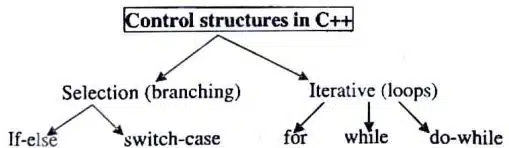
- Branching Statements: These statements execute the block based on the condition. Examples: if, if-else, switch
- Looping Statements: These statements repeat a block of code until a specified condition becomes false. Examples: for, while, do-while
Branching Statements: if statement
The if statement is basically used for checking if the condition is true or false. The if statement is a decision-making statement used to execute a block of code only when a given condition is true.
Syntax:
if(condition)
{
    statements;
}
else
{
    statements;
}
Question: Write a program to find the greatest number among two numbers.
#include <iostream>
using namespace std;

int main()
{
    int a, b;

    cout << "Enter two numbers: ";
    cin >> a >> b;

    if(a > b)
    {
        cout << "Greatest number is: " << a;
    }
    else
    {
        cout << "Greatest number is: " << b;
    }

    return 0;
}
Question: Write a program to check whether the number is even or odd.
#include <iostream>
using namespace std;

int main()
{
    int num;

    cout << "Enter a number: ";
    cin >> num;

    if(num % 2 == 0)
    {
        cout << "Even Number";
    }
    else
    {
        cout << "Odd Number";
    }

    return 0;
}
else-if statement
The else-if statement is used to check multiple conditions one after another. If the first condition is false, the next condition is checked.
Syntax:
if(condition1)
{
    statements;
}
else if(condition2)
{
    statements;
}
else
{
    statements;
}
Question: Write a program to check the greatest number among three numbers.
#include <iostream>
using namespace std;

int main()
{
    int a, b, c;

    cout << "Enter three numbers: ";
    cin >> a >> b >> c;

    if(a > b && a > c)
    {
        cout << "Greatest number is: " << a;
    }
    else if(b > a && b > c)
    {
        cout << "Greatest number is: " << b;
    }
    else
    {
        cout << "Greatest number is: " << c;
    }

    return 0;
}
Switch Statement
A switch statement is used in place of many if statements. The switch statement is a multi-way decision-making statement used to select one block of code from many choices. It checks the value of a variable or expression and executes the matching case.
Syntax:
switch(expression)
{
    case value1:
        statements;
        break;

    case value2:
        statements;
        break;

    default:
        statements;
}
Question: Deciding the day of the week using a switch-case construct.
#include <iostream>
using namespace std;

int main()
{
    int day;

    cout << "Enter day number (1-7): ";
    cin >> day;

    switch(day)
    {
        case 1:
            cout << "Monday";
            break;

        case 2:
            cout << "Tuesday";
            break;

        case 3:
            cout << "Wednesday";
            break;

        case 4:
            cout << "Thursday";
            break;

        case 5:
            cout << "Friday";
            break;

        case 6:
            cout << "Saturday";
            break;

        case 7:
            cout << "Sunday";
            break;

        default:
            cout << "Invalid day number";
    }

    return 0;
}
Looping statement: For loop
The for loop is used to repeat a block of code a fixed number of times. It is mainly used when the number of repetitions is already known.
Syntax:
for (initialisation; condition; increment/decrement)
{
statements;
}
Question: Write a program to print the number from 1 to 5.
#include <iostream>
using namespace std;

int main()
{
    int i;

    for(i = 1; i <= 5; i++)
    {
        cout << i << endl;
    }

    return 0;
}
While Statement
The while statement is a looping statement used to execute a block of code repeatedly as long as the given condition is true. The condition is checked before executing the loop body.
Syntax:
while(condition)
{
    statements;
}
Question: Write a program to print the number from 1 to 5.
#include <iostream>
using namespace std;

int main()
{
    int i = 1;

    while(i <= 5)
    {
        cout << i << endl;
        i++;
    }

    return 0;
}
Do-while statement
When you want to execute a loop at least once, then instead of ‘while’, you can choose a ‘do…while’ loop. In this loop, the test condition is also checked at last, so the loop is executed at least once even though the condition is not getting satisfied while entering the loop itself…
Syntax:
do
{
    statements;
}
while(condition);
Question: Write a program to print the number from 1 to 5.
#include <iostream>
using namespace std;

int main()
{
    int i = 1;

    do
    {
        cout << i << endl;
        i++;
    }
    while(i <= 5);

    return 0;
}
Disclaimer: We have provide you with the accurate handout of “Control Statement in C++“. If you feel that there is any error or mistake, please contact me at anuraganand2017@gmail.com. The above study material present on our websites is for education purpose, not our copyrights.
Images and content shown above are the property of individual organisations and are used here for reference purposes only. To make it easy to understand, some of the content and images are generated by AI and cross-checked by the teachers.